
What is chain congestion?
When blockchain networks such as Arbitrum or Base become busy, they can experience periods of chain congestion. This can lead to higher transaction fees, transaction failures, or long confirmation times. Gains is designed to operate efficiently, but network congestion is outside the app’s control.- Gas fees rise as users compete to get their transactions included.
- Transactions may be delayed, reverted or not included at all if gas fees are too low.
- User experience degrades, especially during periods of extremely high network activity.
Network-wide gas comparisons are also available on ultrasound.money (Ethereum L1) and via chainlist.org for RPC health.
How to manage chain congestion
- Monitor network conditions: when Gains detects unusual congestion or high gas prices on the underlying chain, it displays alerts, banners, tooltips, and notices.

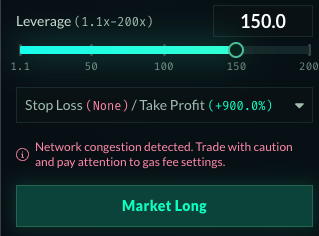
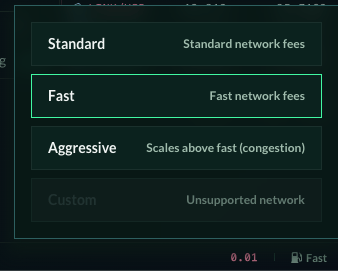
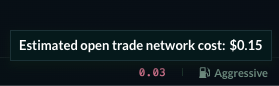
- Adjust gas settings: you can access this option in the footer. Consider changing to
Aggressive, but pay attention to the higher estimated transaction cost shown in the tooltip.
- Change your RPC endpoint: an RPC is the gateway between your wallet and the blockchain. Default RPCs can become slow or unresponsive during congestion. chainlist.org lists alternatives and can help add them to your wallet.